Networking protocols can feel abstract and confusing. What if you could understand the foundational OSI model using something you already know and love: ordering pizza?
Key Take Aways
When I started studying networking, the OSI model felt like academic theory with no practical use. I could memorize the 7 layers, but didn’t understand why they mattered or how they worked together in real networks.
If you’re a CS student, aspiring network engineer, or homelab enthusiast who’s struggled to see how abstract networking concepts apply to actual data transmission, this guide is for you. We’re going to make the OSI model concrete using a delicious analogy.
The OSI Model Explained with Pizza
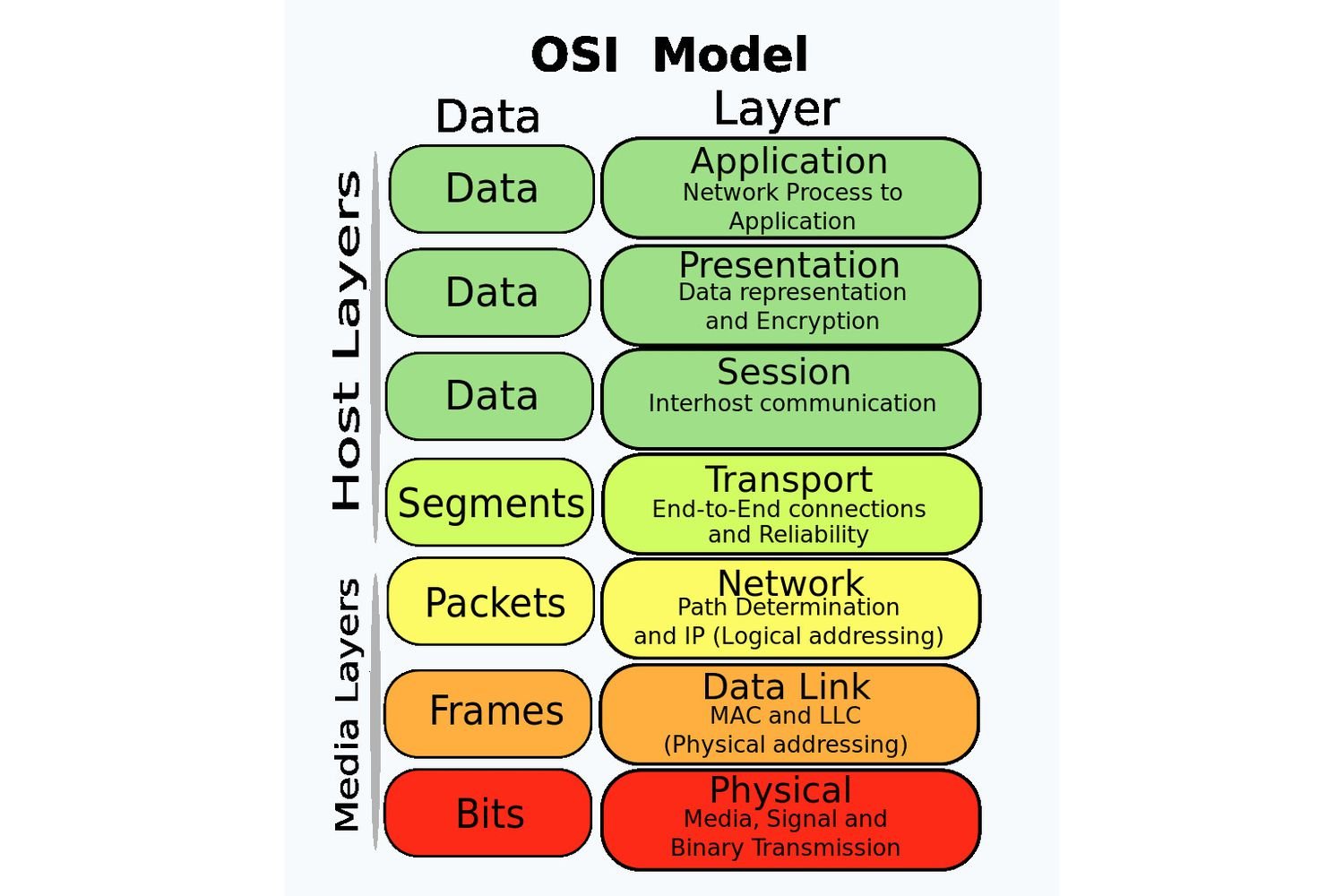
Think of sending data across a network like ordering a pizza. Each step in the process maps perfectly to one of the 7 OSI layers. Let’s break it down layer by layer.
Layer 7: Application – The Menu and Order
This is where you interact with the system. You look at the pizza menu (the application) and decide what you want. In networking terms, this is your web browser, email client, or any app that needs to send or receive data.
Real-world examples: HTTP for web browsing, SMTP for email, FTP for file transfers
Layer 6: Presentation – The Kitchen Instructions
Your order gets translated into kitchen instructions. “Large pepperoni pizza” becomes specific cooking directions. In networking, this layer handles data formatting, encryption, and compression.
What happens here: SSL/TLS encryption, JPEG/MPEG compression, data serialization
Layer 5: Session – The Phone Connection
The phone call establishes a session between you and the pizza place. In networking, this layer manages the connection – starting it, maintaining it, and ending it properly.
Session management: Authentication, reconnection if dropped, clean termination
Layer 4: Transport – The Delivery Guarantee
This layer ensures your pizza arrives intact and in order. TCP (Transmission Control Protocol) is like a careful delivery driver who confirms receipt; if a slice goes missing, they bring another. UDP (User Datagram Protocol) is like shouting your order; no guarantees it arrives.
Key concept: TCP for reliability, UDP for speed
Layer 3: Network – The Address Routing
The delivery driver uses your address to find your location. In networking, this is IP addressing and routing, getting data from source to destination across multiple networks.
Networking devices: Routers operate at this layer
Layer 2: Data Link – The Street Navigation
The driver navigates your specific street and finds your house. This layer handles communication between directly connected devices on the same network segment.
Networking devices: Switches operate at this layer using MAC addresses
Layer 1: Physical – The Actual Pizza
The physical pizza being transported. In networking, this is the actual electrical signals, light pulses, or radio waves carrying the data.
Physical components: Cables, network cards, wireless signals
Real-World Example: Sending an Email
Let’s trace an email through all 7 layers using our pizza analogy:
1. Application: You type the email in Gmail
2. Presentation: Gmail encrypts your message
3. Session: A connection is established with Google’s servers
4. Transport: TCP ensures all email data arrives completely
5. Network: IP addresses route your email to the recipient’s mail server
6. Data Link: Switches direct the data through your local network
7. Physical: Electrical signals travel through Ethernet cables
Common Mistakes to Avoid
Your Turn to Practice
Try this: The next time you browse a website, mentally trace the layers: